

Digital toolkit for modern harvesting
PONSSE Manager, a digital system developed by Ponsse, gathers data from machines that have been connected to the service. Thanks to PONSSE Manager, decisions can be based on real data instead of an assumption. Comprehensive reporting, smooth fleet management, fuel consumption monitoring and preventive maintenance are examples of PONSSE Manager’s benefits that quickly translate into significant improvements in production and efficiency. Manager can be used with PC, tablet, and smartphone alike.
The new level of productive and responsible harvesting
The free Manager Standard service package helps in fleet management and in monitoring the progress of harvesting.
By far the greatest advantage can be achieved by signing up to Manager Pro – a service that is subject to a fee. Manager Pro’s advanced features help take into account all the little details that together can make any site more productive. Harvesting becomes more transparent and thanks to the accumulating data, it can be developed for all logging sites.
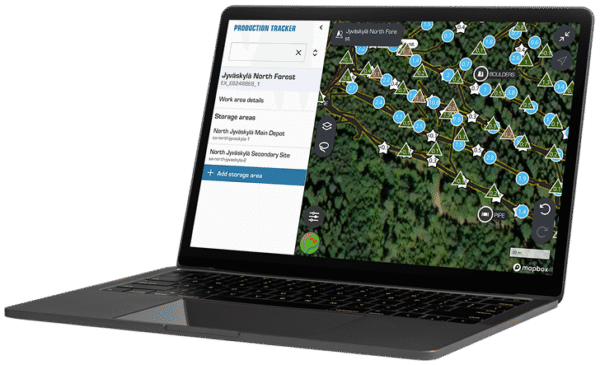
Map Tools enable easier and near real-time monitoring of progress in the work area. The Emissions Report feature helps place the right machine to the right job site through emission monitoring, leading to improved performance and better efficiency across the board. The emissions can be better controlled, which benefits forest companies, forest owners and surrounding societies alike.

|

|
|---|---|
|
Free
|
Subject to a fee
 |
|
Features:
|
Features:
|
| Summary Page | Summary Page |
| Fleet Management | Fleet Management |
| Reports | Reports |
| Service Calendar | Service Calendar |
| Ponsse Apps mobile application | Ponsse Apps mobile application |
| Map Tools | |
| Emmisions Report |
Manager PRO – A look at the features




Order Manager Pro – take advantage of a 3-month free trial period!
All new subscribers of Manager Pro service package can now test its features for three months completely free of charge! The trial period does not bind or oblige to anything. Instead, it provides an excellent opportunity to see for yourself how Manager Pro can make work more effective in many ways – from the viewpoints of forest machine entrepreneurs, machine operators and the office personnel alike.
A tool that develops with the needs of harvesting
Ponsse has always taken pride in manufacturing the world’s best forest machines, as well as in developing services that best support their operations. These convenient and useful features are already included in both PONSSE Manager service packages.
Today, digital tools are at the core of productive harvesting. We improve the functionality of PONSSE Manager continuously and add new features that best relate to the needs of modern harvesting. As a Manager Pro customer, you can ensure being among the first ones to have all these new features at your service.
Gain deeper operational insight with Shifts report, available in Fleet Report. This addition displays two detailed shift tables – one for harvesters and one for forwarders, giving you a clear view of machine performance across your operations.
Track all key shift KPIs at a glance, including:
– Work time
– Production
– Fuel consumption
– Driven distance
With flexible time frame selection and advanced filtering options, you can easily pinpoint the exact shifts you need to analyze. In addition, exporting your data is simple: just one click to send shift tables directly to Excel.
Creating operator profiles has never been easier. With Fast Operator Creation, you can quickly generate profiles based on real machine data — no manual input needed.
You can also filter your view to show or hide these machine-detected operators, keeping your list clean and focused.
Save time with Favorite Reports. With the new Favorite Reports feature, you can now save and reuse your filter settings across all your Manager reports. It works on every report and allows you to store up to 10 favorite filter sets per report.
Service Calendar is a feature for scheduling and reporting your own services.
Customers can schedule services and track them directly in an easy-to-use calendar view. Service intervals can be set individually for each machine in the Company Settings, and the calendar automatically displays when the next service is due based on these intervals. Customers can review their full service history, keeping records organized and accessible.
This feature operates independently of other Ponsse systems – services provided by Ponsse are not shown here. This feature is ideal for customers who perform their own maintenance or want to closely monitor service intervals.
Keep track of machine shift data in near-real-time.
View shift data from today, last week, or the current month, and see operator and machine details at a glance. In addition it’s possible to track total production, including:
– Number of stems
– Average stem volume
– G15 productive time
If the MOM file hasn’t been received yet, the widget still shows production data from other available sources.
Machine Shifts Widget displays the total number of shifts during the selected time frame.
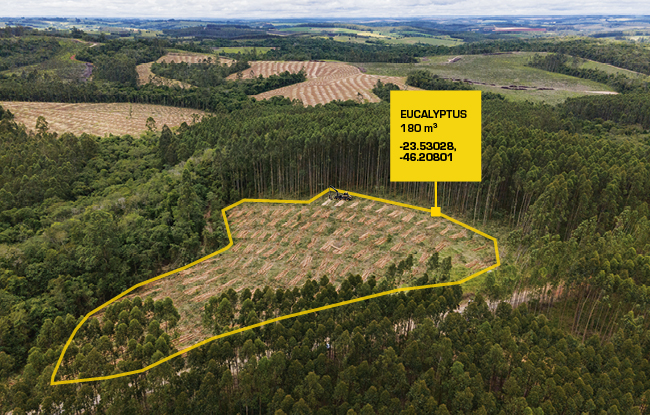
Easily track Cumulative Production by tree species and assortments – the production is visible per work area.
Supports operational planning – you can see, for example:
– How much production has been completed compared to the estimated amount
– The total volume of each tree species and assortments from the entire site
– When a machine transport might be needed
Cumulative Production is available in Fleet Management by work area.
No matter where you are in the world – you can now set the right units directly from Manager. Whether you’re working in Metric, US standard, or your own custom setup – you’re covered.
Choose your preferred units for volume, diameter, length, distance, mass, and fuel consumption.
Pricing
The monthly fee for Manager Pro service is €50 per machine when purchased directly from Ponsse. Pricing may vary when purchased through authorized dealers. The service is billed in accordance with your selected billing interval. Local currency pricing, taxes and fees may apply. Please check the price with your local Ponsse representative or dealer. You may terminate the service at any time. The service will remain active until the end of the current billing period. Ponsse may update pricing and terms from time to time.
